
3.6 KiB
ReforgerEQ
PipeWire/PulseAudio helper for exposing Arma Reforger's 5.1 output on Linux.
This project has two parts to running:
- Create a temporary 5.1 sink so Reforger negotiates surround channels.
- Manually open the Carla EQ project and wire it to your real stereo output.
Watching the graph in qpwgraph is recommended while testing.
Requirements
- PipeWire with PulseAudio compatibility
- Arma Reforger through Steam/Proton
- Carla
- LSP VST Plugins
For the Carla EQ stage on Arch:
sudo pacman -S carla lsp-plugins-vst
Normal Use (after first time install)
Optional - Install script as a callable service
install -Dm755 reforger-eq ~/.local/bin/reforger-eq
~/.local/binmust be on yourPATH. If the command is not found after installing, open a new terminal or reload your shell config.If you choose not to install it, you can refer to it by running like a standard bash script ie.
cdto the project directory and use./reforger-eqto run.
Installation
Due to program restrictions on both Arma and Carla, there is a three part process to installing first time.
Part 1. Expose Reforger 5.1 Channel
First time install
reforger-eq up
# launch Arma Reforger manually
reforger-eq expose
reforger-eq restore
reforger-eq check
This creates the 5.1 sink, makes it default, launches Reforger, waits for the game audio stream, restores your previous default device, then exposes Reforger back to the 5.1 sink.
After installing
reforger-eq launch
If launch errors or times out, use the manual flow from first time install.
If Reforger negotiates only
2ch, restart the game and investigate manually withqpwgraph,reforger-eq status, andpactl list sink-inputs.
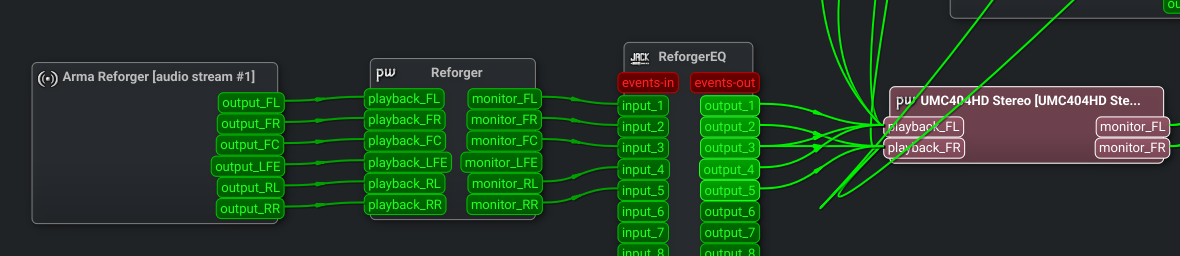
Expected final QPWGraph wiring:
Part 2. Open ReforgerEQ Carla
Open reforger-eq.carxp through Carla:
- Launch Carla
- Click on Open
- Open
reforger-eq.carxp
Recommended (optional) KDE one-click launcher for start menu:
- Right click the start menu or open
Menu Editor- Choose
Edit Applications.- Create a new item.
- Name:
Reforger EQ Carla- Program:
carla- Command line arguments:
/path/to/reforger-eq.carxp
Part 3. Carla Output Wiring
If you want to use
qpwgraphto do this step, feel free. Be aware that it (sometimes) won't auto-wire when ReforgerEQ Carla gets reset. Using Carla's patchbay means it will always link itself to what is saved in the .carxp file.
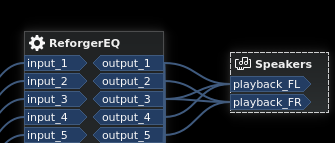
Enter carla, click on the small tab patchbay and wire Carla outputs to your real output device's playback ports:
Output 1 -> playback_FL
Output 2 -> playback_FR
Output 3 -> playback_FL and playback_FR
Output 4 -> playback_FL
Output 5 -> playback_FR
Carla patchbay example:
'Speakers' is a generic device, your device name may vary.
Useful Commands
reforger-eq up       # create sink, save default, make 5.1 default
reforger-eq launch   # up, launch Steam app, wait for stream, restore
reforger-eq restore  # restore previous default, then expose Reforger
reforger-eq expose   # move running Reforger stream to the 5.1 sink
reforger-eq check    # report whether Reforger is 2ch or 6ch
reforger-eq down     # restore default and unload the 5.1 sink
Configuration
REFORGER_EQ_SINK_NAME=reforger_eq_51
REFORGER_EQ_DESCRIPTION="ReforgerEQ 5.1"
REFORGER_EQ_APP_NAME="Arma Reforger"
REFORGER_EQ_STEAM_URI=steam://rungameid/1874880
REFORGER_EQ_WAIT_SECONDS=90
LFE is silent even when Reforger is outputting 6ch.