| assets | ||
| README.md | ||
| reforger-audio.carxp | ||
| reforger-surround | ||

reforger-surround
PipeWire/PulseAudio helper for exposing Arma Reforger's 5.1 output on Linux.
This project has two parts:
- Create a temporary 5.1 sink so Reforger negotiates surround channels.
- Manually open the Carla EQ project and wire it to your real stereo output.
Watching the graph in qpwgraph is recommended while testing.
Requirements
- PipeWire with PulseAudio compatibility
pactl- Arma Reforger through Steam/Proton
For the Carla EQ stage on Arch:
sudo pacman -S carla lsp-plugins-vst
Install
install -Dm755 reforger-surround ~/.local/bin/reforger-surround
1. Expose Reforger 5.1
Preferred flow:
reforger-surround launch
This creates the 5.1 sink, makes it default, launches Reforger, waits for the game audio stream, restores your previous default device, then exposes Reforger back to the 5.1 sink.
Check the result:
reforger-surround check
Good:
Sample Specification: ... 6ch 48000Hz
Channel Map: front-left,front-right,front-center,lfe,rear-left,rear-right
If launch errors or times out, use the manual flow:
reforger-surround up
# launch Arma Reforger manually
reforger-surround restore
reforger-surround check
If Reforger negotiates only 2ch, restart the game and investigate manually with qpwgraph, reforger-surround status, and pactl list sink-inputs.
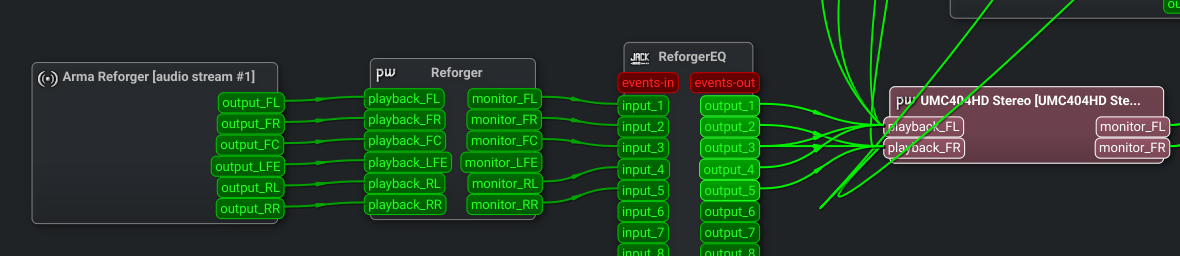
Expected final QPWGraph wiring:
2. Open ReforgerEQ Carla
Open reforger-audio.carxp through Carla:
pw-jack /usr/bin/python3 /usr/share/carla/carla --with-appname=carla --with-libprefix=/usr /path/to/reforger-audio.carxp
Optional KDE launcher:
- Open the start menu.
- Choose
Edit Applications. - Create a new item.
- Name:
Reforger EQ Carla - Program:
pw-jack - Command line arguments:
/usr/bin/python3 /usr/share/carla/carla --with-appname=carla --with-libprefix=/usr /path/to/reforger-audio.carxp
3. Carla Output Wiring
Carla patchbay example:
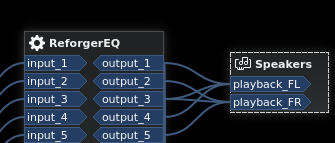
Wire Carla outputs to your real output device's playback ports:
Output 1 -> playback_FL
Output 2 -> playback_FR
Output 3 -> playback_FL and playback_FR
Output 4 -> playback_FL
Output 5 -> playback_FR
Useful Commands
reforger-surround up       # create sink, save default, make 5.1 default
reforger-surround launch   # up, launch Steam app, wait for stream, restore
reforger-surround restore  # restore previous default, then expose Reforger
reforger-surround expose   # move running Reforger stream to the 5.1 sink
reforger-surround check    # report whether Reforger is 2ch or 6ch
reforger-surround down     # restore default and unload the 5.1 sink
Configuration
REFORGER_SURROUND_SINK_NAME=reforger_surround_51
REFORGER_SURROUND_DESCRIPTION="Reforger Surround 5.1"
REFORGER_SURROUND_APP_NAME="Arma Reforger"
REFORGER_SURROUND_STEAM_URI=steam://rungameid/1874880
REFORGER_SURROUND_WAIT_SECONDS=90
LFE may be silent even when Reforger is outputting 6ch.